Exports
Exports allow you to generate and download files from your Increase account. This includes data reports (like transaction CSVs and account statements) as well as documents (like verification letters and tax forms).
They are useful for analyzing your account data in other tools, migrating to another service, or for information gathering purposes.
Making an Export
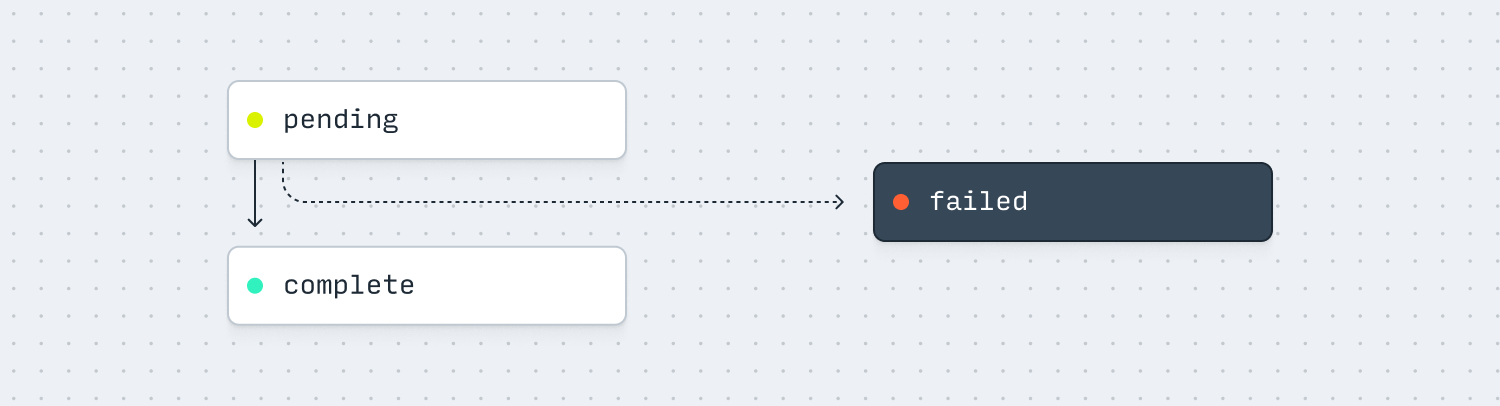
You can create an Export in the API or Dashboard. Once you create an Export, it will have status: pending. When it’s ready, the Export’s status will transition to status: complete and the result dictionary will become available with the file_id child attribute populated. This file_id references a File containing the generated export contents. We’ll send you a webhook for this and optionally notify you via email.
To download the Export via the API, use File Links to generate a URL that can be used to download the File.
Lifecycle
| Status | Description |
|---|---|
pending | The Export file is being created and is not ready to download. |
complete | The Export file has been created and is ready to download. |
failed | The Export file failed to be created. |
Types of Export
When you create an Export, you’ll need to indicate what category you want. We’re working on more export types, but please let us know if there’s a field or type that would be helpful to you!
Data Reports
These exports allow you to download large amounts of data from your Increase account. You can filter by specifying things like time ranges and accounts.
| Category | Description |
|---|---|
account_statement_bai2 | A BAI2 file of transactions and balances for a given date and optional Account. |
account_statement_ofx | An Open Financial Exchange (OFX) file of transactions and balances for a given time range and Account. |
daily_account_balance_csv | A CSV of daily account balances for the dates in a given range. |
dashboard_table_csv | Certain dashboard tables are available as CSV exports. This export cannot be created via the API. |
entity_csv | A CSV of entities with a given status. |
fee_csv | A CSV of fees for a given time range. |
transaction_csv | A CSV of all transactions for a given time range. |
vendor_csv | A CSV of vendors added to the third-party risk management dashboard. |
Documents
These exports generate PDF documents for specific purposes.
| Category | Description |
|---|---|
account_verification_letter | A PDF letter verifying account ownership, often used when demonstrating ownership to a third party. |
funding_instructions | A PDF with instructions for funding an account, including routing and account numbers. |
form_1099_int | A PDF of an IRS Form 1099-INT for interest income. This export cannot be created via the API. |
form_1099_misc | A PDF of an IRS Form 1099-MISC for miscellaneous income. This export cannot be created via the API. |
voided_check | A PDF of a voided check for a given Account Number. |
Timezones
All exports use UTC. A day runs from midnight UTC up to, but not including, the next midnight UTC. Timestamps in CSVs are ISO 8601 times in UTC, for example 2026-02-01T04:00:00Z.
Here’s how that applies to each export that takes a date or time range:
| Category | How UTC applies |
|---|---|
transaction_csv | Time range filters are compared against each Transaction’s created_at. A Transaction created at 8:00 PM Pacific Time on January 31, 2026 is 2026-02-01T04:00:00Z, so it’s included in a range starting February 1. |
daily_account_balance_csv | Each row is one UTC day. The ending balance for January 31, 2026 is the balance at 2026-02-01T00:00:00Z. |
account_statement_bai2 | effective_date is a UTC date. A past date reports that day’s transactions, with closing balances as of midnight UTC at the end of the day. Today’s date reports transactions since midnight UTC, with current balances as of when the Export was created. |
account_statement_ofx | Time range filters are compared against each Transaction’s created_at, and the balance is as of the end of the range. Dates picked in the Dashboard run from midnight UTC on the first date up to, but not including, midnight UTC after the last date. |
fee_csv | Time range filters are compared against each Fee’s accrued_at time. Dates picked in the Dashboard run from midnight UTC on the first date up to, but not including, midnight UTC after the last date. |
In the Dashboard, balance graphs use your computer’s timezone, so a graph’s end-of-day balance can differ from daily_account_balance_csv. The transactions table export lets you choose Local or UTC date ranges; choose UTC to match monthly account statements and other exports.
Backwards compatibility
Exports are currently in beta, and we’ll occasionally add or remove columns in our reports depending on user feedback. This might change the absolute ordering of columns. If you’re automatically ingesting these CSVs in code, we recommend you not rely on column ordering and instead use the column headers to know how to parse each column.