3D Secure
3D Secure (3DS) is a protocol governed by EMVCo that lets you verify a cardholder’s identity before a card payment is authorized. Unlike card authorizations, 3DS follows a strict state machine with well-defined stages. When a merchant initiates a 3DS authentication attempt, Increase creates a card_authentication entry on the Card Payment.
The 3DS API is composed of a few parts:
- Card Payments API: The
card_authenticationelement under a Card Payment covers the lifecycle of a 3DS authentication attempt. - Real-Time Decisions API: Two real-time decision categories,
card_authentication_requestedandcard_authentication_challenge_requested, let you control the authentication flow. - Simulations API: Sandbox endpoints for testing the full authentication flow.
Authentication flow
A challenge-based authentication unfolds as three separate requests:
- The merchant’s request for 3DS authentication, which you decision to create a Card Authentication
- The cardholder’s device initiating the challenge, which triggers sending a one-time code to the cardholder
- The cardholder entering the one-time code to complete the Card Authentication
The Card Authentication object tracks the state of the authentication flow.
Card Authentication lifecycle
| Status | Description |
|---|---|
denied | The authentication attempt was denied. |
authenticated_without_challenge | Approved without requiring a challenge. |
awaiting_challenge | A challenge has been requested and we are waiting for the cardholder’s client to initiate it. |
validating_challenge | The challenge is in progress and the cardholder is entering their one-time code. |
authenticated_with_challenge | The cardholder successfully completed the challenge. |
timed_out_awaiting_challenge | The cardholder’s client did not initiate the challenge in time. |
exceeded_attempt_threshold | The cardholder exceeded the maximum number of challenge attempts. |
canceled | The authentication was canceled. |
errored | An error occurred during the authentication. |
A Card Authentication progresses through a series of statuses as the authentication attempt is processed. Here is a typical challenge-based flow:
- We receive an authentication request from Visa with metadata about the purchase. You receive a
card_authentication_requestedreal-time decision. You action the real-time decision withcard_authentication.decisionset tochallenge, which causes a Card Authentication to be created in statusawaiting_challenge. - The cardholder’s client (a browser or app) connects to Increase to initiate the challenge. We generate a one-time code and send you a
card_authentication_challenge_requestedreal-time decision containing the code. You deliver it to your cardholder via text message or email. The authentication moves tovalidating_challenge. - The cardholder enters the one-time code. If correct, the authentication moves to
authenticated_with_challenge. We generate a cryptographic Cardholder Authentication Verification Value (CAVV) that is sent to the acquirer through Visa. - The acquirer kicks off the card authorization, including the CAVV in the authorization message to tie it to the successful authentication. The Card Payment now has both a
card_authenticationand acard_authorizationelement.
If at step 1 you are confident in the transaction, you can approve the Card Authentication directly. This results in a status of authenticated_without_challenge and skips the challenge steps entirely. Denying it instead resolves the Card Authentication to denied.
Merchants usually decide on their own whether to start 3D Secure. To ask a merchant to authenticate a purchase you would otherwise decline, see Requesting 3D Secure.
Real-time decisions
We recommend first reading our Real-Time Decisions guide for background on how real-time webhooks work.
Responding to authentication requests
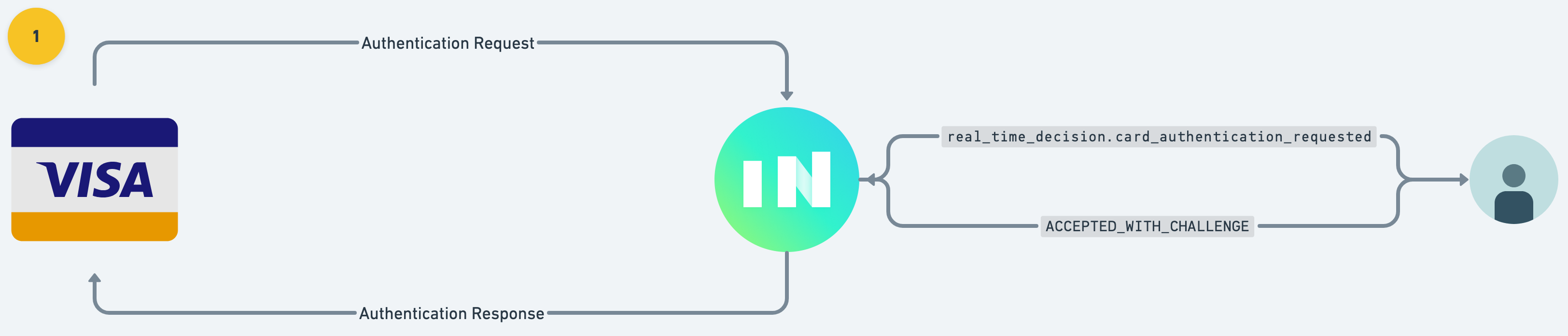
When a merchant attempts to authenticate a purchase, Increase creates a Real-Time Decision with category: card_authentication_requested. This comes with metadata about the purchase including merchant details and the purchase amount. Your application decides how to proceed:
approve: Authenticate the transaction without a challenge (frictionless).challenge: Request the cardholder to verify their identity with a one-time code.deny: Deny the authentication attempt outright.
To action the decision, POST to the Real-Time Decision action endpoint:
curl -X "POST" \
  --url "https://api.increase.com/real_time_decisions/${REAL_TIME_DECISION_ID}/action" \
  -H "Authorization: Bearer ${INCREASE_API_KEY}" \
  -H "Content-Type: application/json" \
  -d '{
    "card_authentication": {
      "decision": "challenge"
    }
  }'
Delivering the challenge
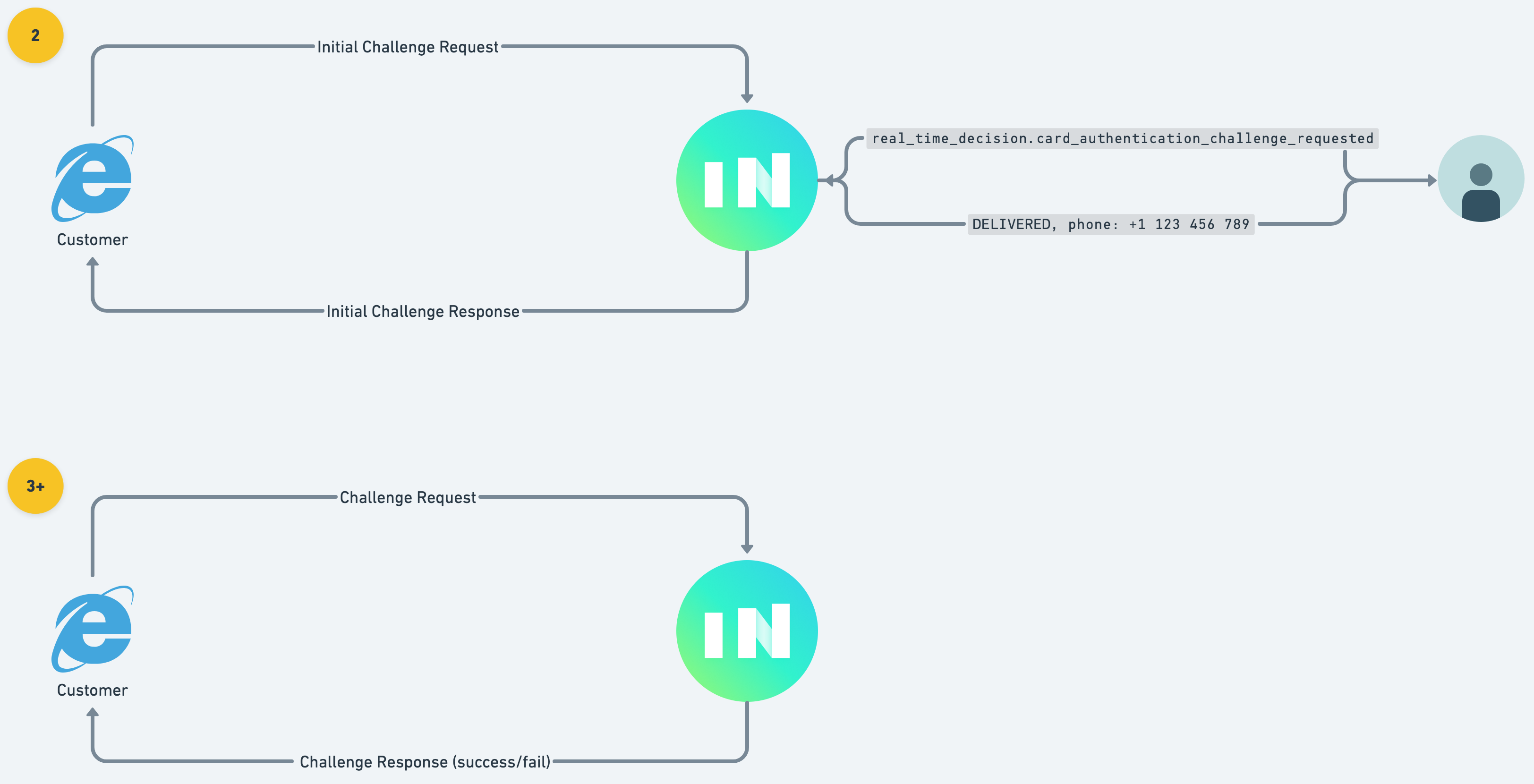
If you request a challenge, the cardholder’s client (browser or app) will connect to Increase to start the challenge process. Increase creates a second Real-Time Decision with category: card_authentication_challenge_requested. This decision includes a one_time_code that you must deliver to your cardholder via text message or email.
Once you’ve delivered the code, action the decision with the result:
curl -X "POST" \
  --url "https://api.increase.com/real_time_decisions/${REAL_TIME_DECISION_ID}/action" \
  -H "Authorization: Bearer ${INCREASE_API_KEY}" \
  -H "Content-Type: application/json" \
  -d '{
    "card_authentication_challenge": {
      "result": "success"
    }
  }'
If your application is unable to deliver the one-time code, respond with "result": "failure".
After the challenge is delivered, Increase renders an interface to the cardholder where they enter the one-time code. We validate their attempts and update the card_authentication status accordingly.
Testing in sandbox
You can simulate the end-to-end authentication flow using three sandbox endpoints.
1. Simulate an authentication attempt
Create a simulated 3DS authentication request for a card:
curl -X "POST" \
  --url "${INCREASE_URL}/simulations/card_authentications" \
  -H "Authorization: Bearer ${INCREASE_API_KEY}" \
  -H "Content-Type: application/json" \
  -d '{
    "card_id": "card_oubs0hwk5rn6knuecxg2"
  }'
This returns a Card Payment with a card_authentication element. If you have a card_authentication_requested real-time decision subscription, you’ll receive the webhook and can action the decision.
2. Simulate initiating a challenge
After requesting a challenge, simulate the cardholder’s client connecting to start the challenge:
curl -X "POST" \
  --url "${INCREASE_URL}/simulations/card_authentications/${CARD_PAYMENT_ID}/challenges" \
  -H "Authorization: Bearer ${INCREASE_API_KEY}"
This triggers the card_authentication_challenge_requested real-time decision with the one-time code.
3. Simulate a challenge attempt
Simulate the cardholder entering the one-time code:
curl -X "POST" \
  --url "${INCREASE_URL}/simulations/card_authentications/${CARD_PAYMENT_ID}/challenge_attempts" \
  -H "Authorization: Bearer ${INCREASE_API_KEY}" \
  -H "Content-Type: application/json" \
  -d '{
    "one_time_code": "123456"
  }'
Alternatively, you can navigate to https://dashboard.increase.com/card_authentication_simulation/${CARD_PAYMENT_ID} and enter the one-time code directly.
If the code matches, the card_authentication status moves to authenticated_with_challenge.